Skip to content
Fitwell for ClaudeAsk for an invite

Track food, training and weight by talking to Claude

Tell Claude what you ate, ask it to plan your week, start a workout from the chat and open a dashboard when you want to see how you are doing.

  • Claude on desktop, web and iPhone
  • Health data stored in the EU
  • Invite-only
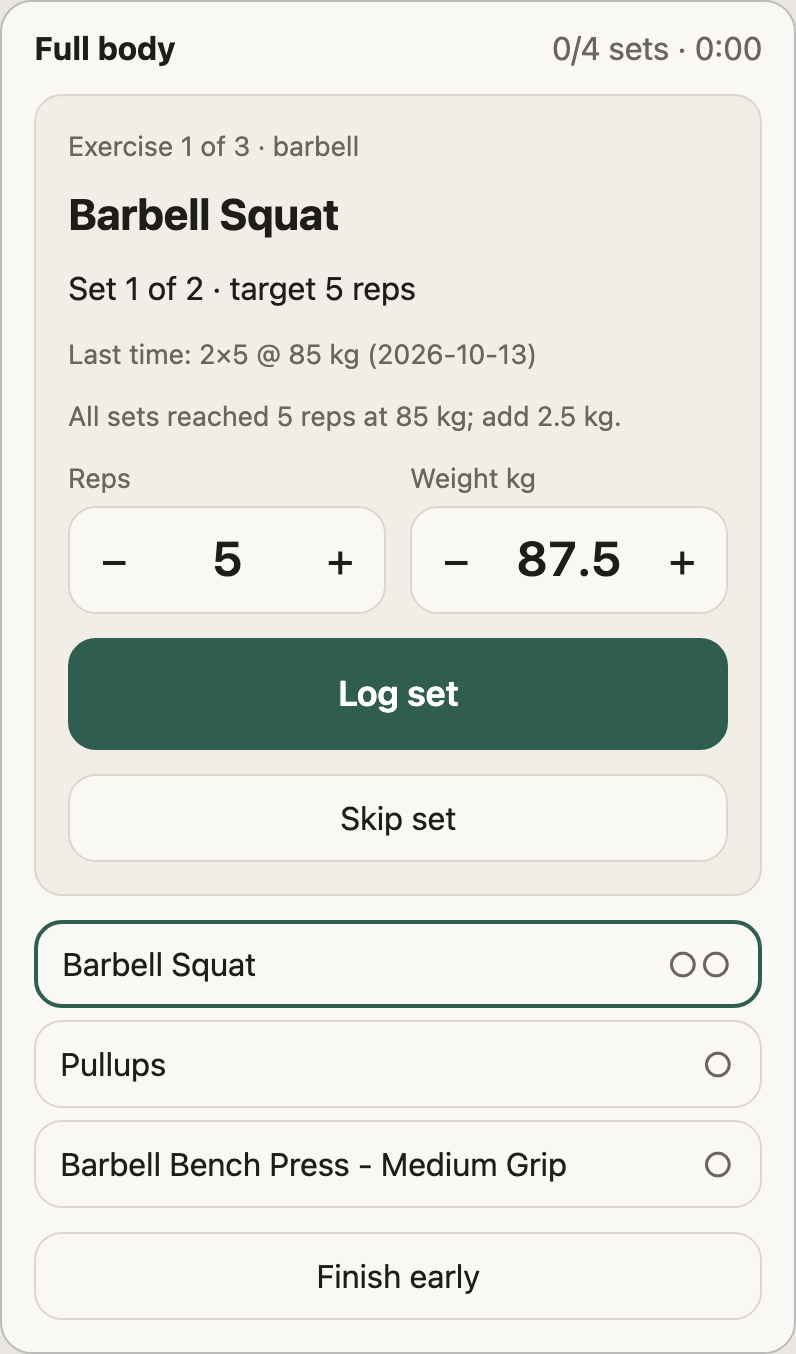
The workout player showing Barbell Squat, set 1 of 2: last time 2 by 5 at 85 kg, so today 87.5 kg, with a Log set button

You talk, it keeps the records.

You: Same breakfast as yesterday.

ClaudeLogged: 80 g oats, 280 g milk and a banana, 495 kcal and 22 g protein. You have 1,805 kcal and 128 g protein left today.

You: Is my calorie goal still right?

ClaudeYour logs and weigh-ins over 4 weeks show you burn about 2,940 kcal a day. To lose 0.5 kg a week that means about 2,390 kcal. Shall I update the goal?

You: Start Workout A. The squat rack is taken.

ClaudeSwapped the back squat for the leg press and kept your 3 sets of 8. Last time you hit every rep at 120 kg, so today is 122.5 kg.

Numbers come from the demo person in the screenshots; Claude's wording will differ.

What it does

Food and macros without the typing

  • Describe a meal and it is logged with calories, protein, carbs and fat, from 1,381 foods in the Danish national database plus packaged products via Open Food Facts.
  • Snap a nutrition label to add a product.
  • Log a meal from a photo, clearly marked as an estimate.
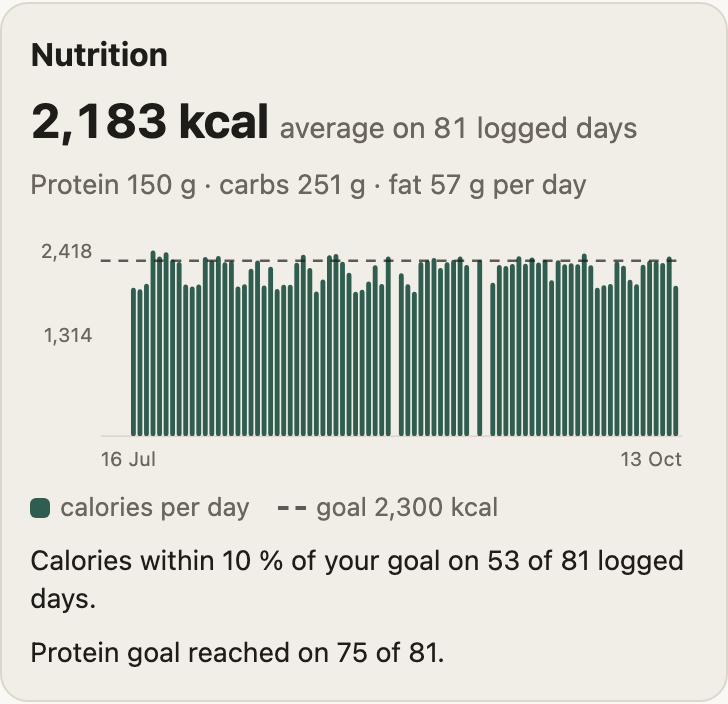
Nutrition card: daily calories over 90 days against a goal line, within 10 percent of the goal on 53 of 81 logged days and the protein goal reached on 75

A calorie goal that learns your real burn

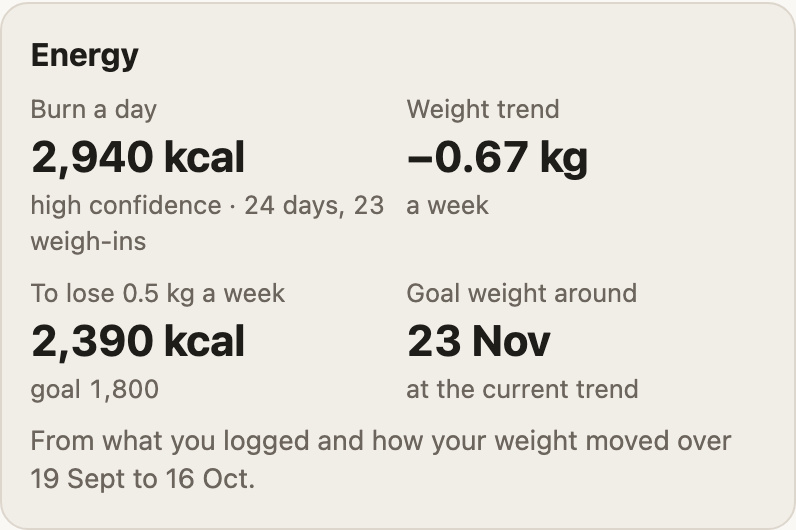
  • After a few weeks of logging and weigh-ins, Fitwell measures how much you actually burn.
  • It suggests a goal from that number. Claude asks before changing anything.
Energy card in the weekly review: burn about 2,940 kcal a day with high confidence from 24 days and 23 weigh-ins, weight trend minus 0.67 kg a week, and 2,390 kcal a day to lose 0.5 kg a week

Workouts you start from the chat

  • A workout player inside Claude with big buttons and a rest timer.
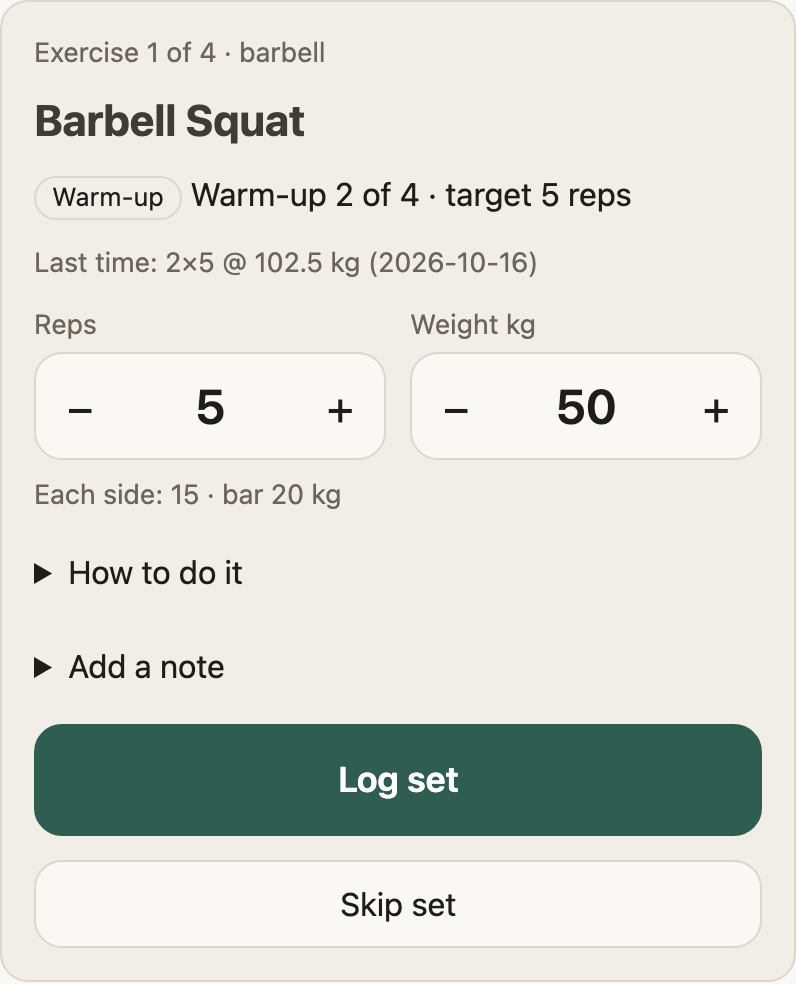
  • Weights suggested from your history: add 2.5 kg when every set hit its reps. Warm-up sets show plates per side; supersets work too.
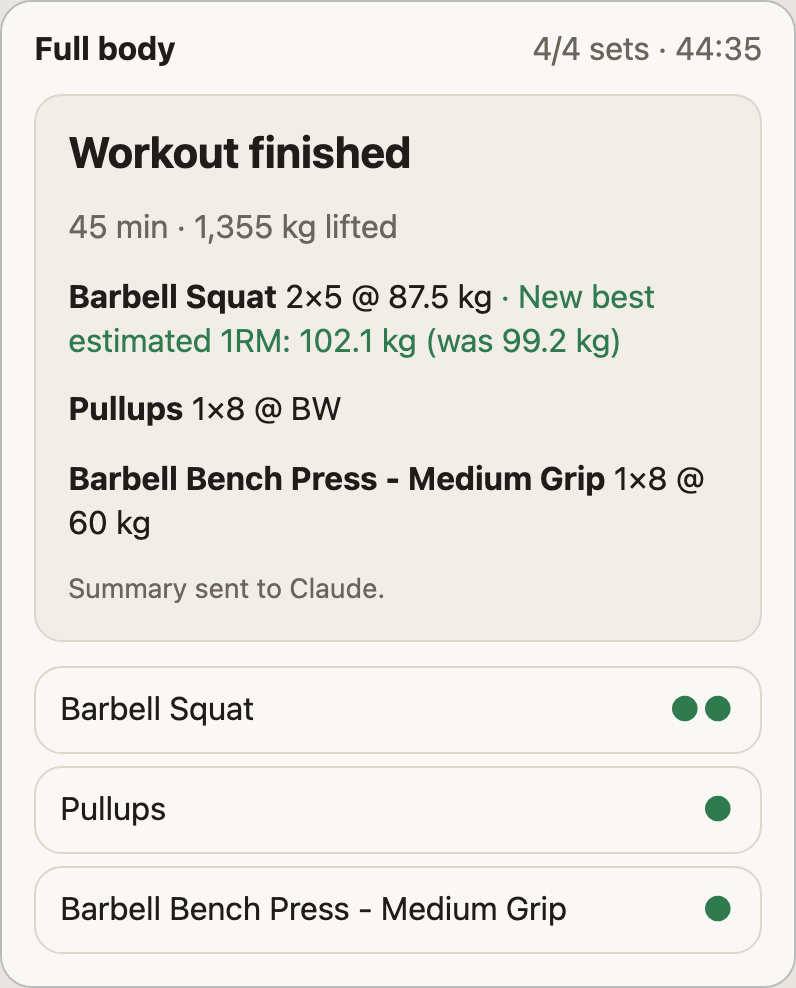
  • A summary with new personal bests goes back to Claude.
A warm-up set of barbell squats: warm-up 2 of 4, 5 reps at 50 kg, 15 kg each side on a 20 kg bar
The finished workout summary: 45 minutes, 1,355 kg lifted and a new best estimated one-rep max for the squat

Swap when the machine is busy

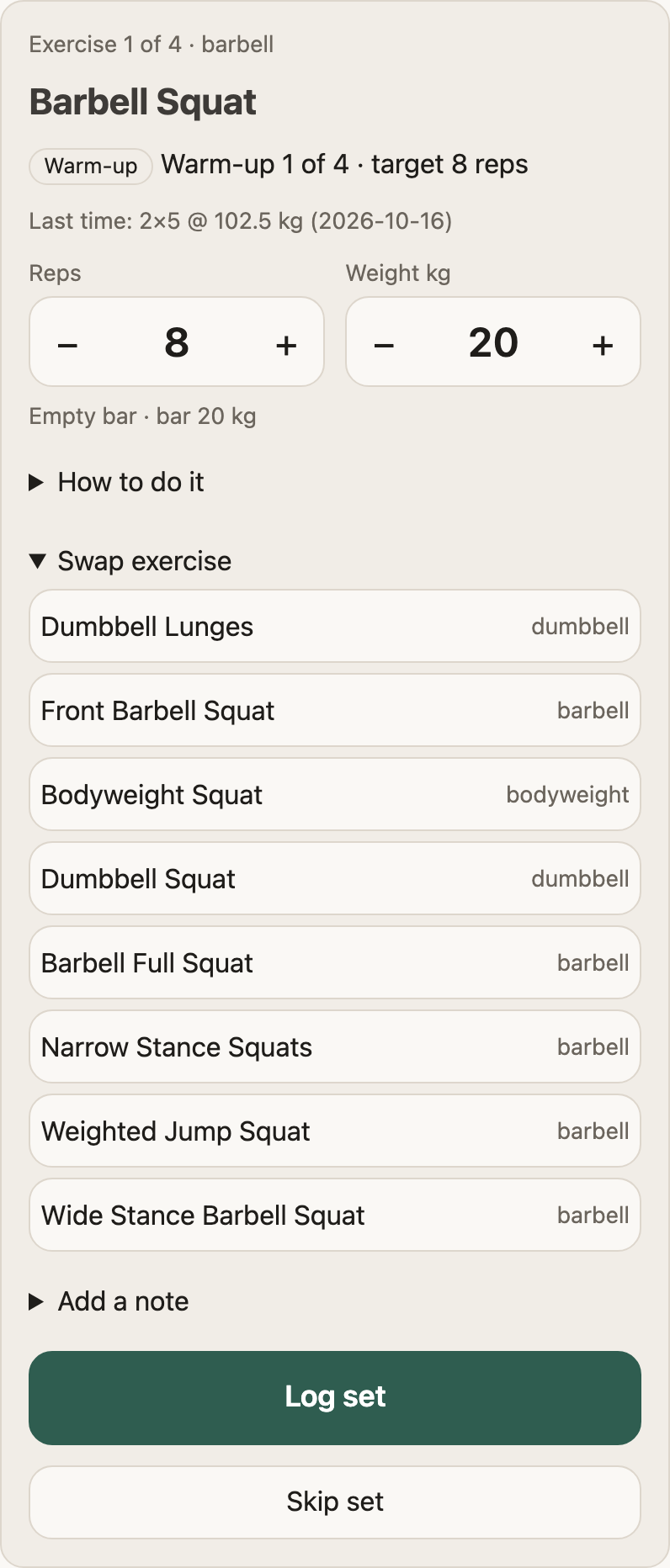
  • Similar exercises for the same muscles, within the equipment you have.
Swap exercise opened under the barbell squat, listing dumbbell lunges, front squat, bodyweight squat, dumbbell squat and more, each with its equipment

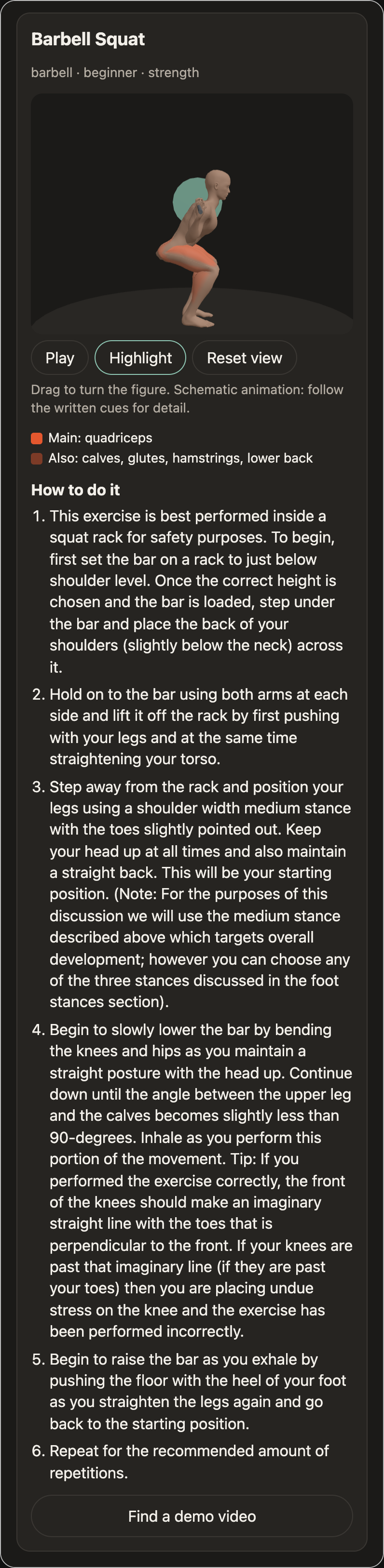
How to do it, in 3D

  • An animated 3D body for the main lifts and many machine and cable exercises.
  • The working muscles are tinted, with setup tips underneath.
The barbell squat guide in the dark theme: a 3D body at the bottom of a back squat with the thighs and glutes tinted

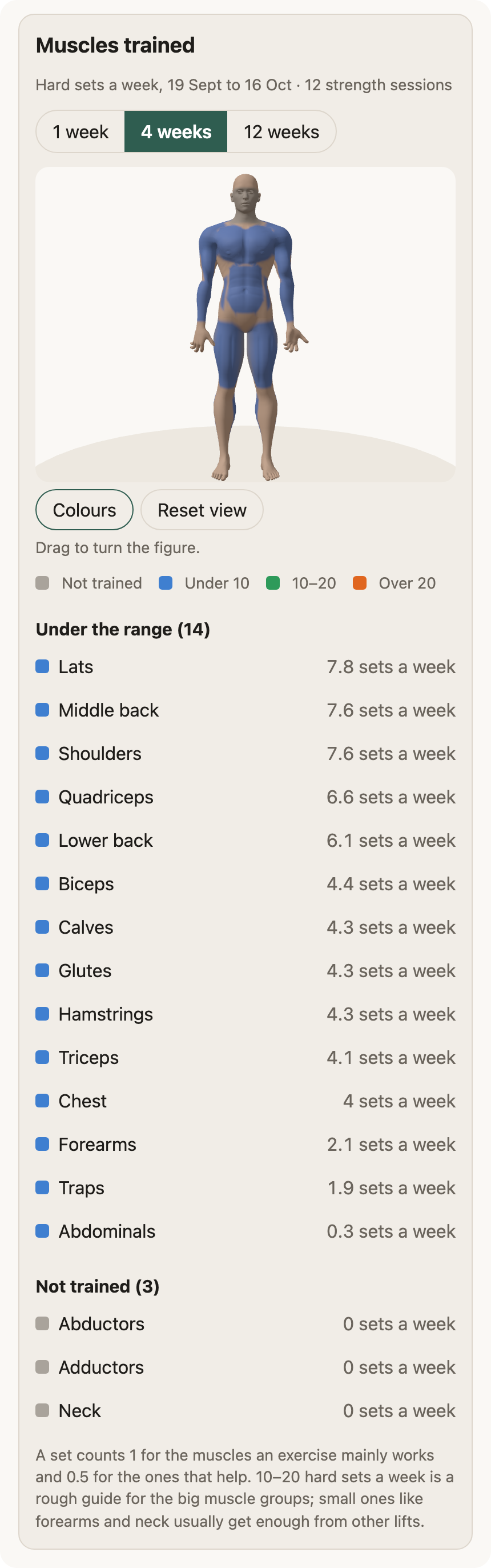
Which muscles you actually train

  • A 3D muscle map coloured by hard sets per week, compared with the usual 10 to 20.
The muscle map for 4 weeks: a 3D body coloured by weekly hard sets, a legend, and every muscle listed with its sets per week

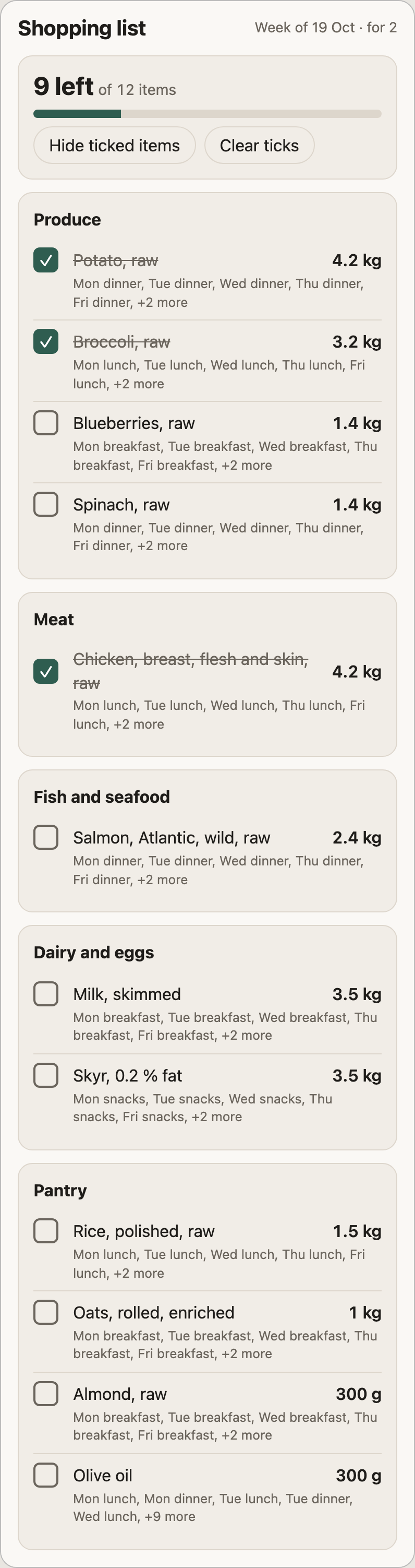
A week of meals and the shopping list

  • A week planned around your goals, allergies and recipes, checked before you see it.
  • A shopping checklist you tick off inside the chat.
The week's shopping checklist: 9 of 12 items left, grouped into Produce, Meat, Fish, Dairy and Pantry, with three items ticked off

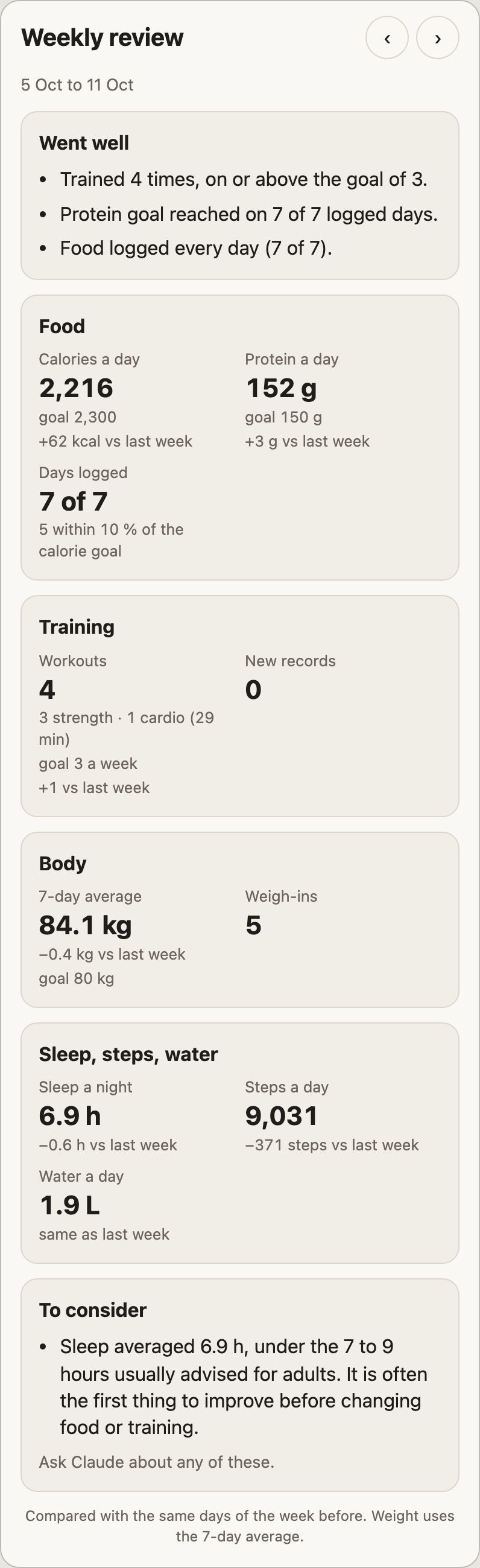
A weekly review

  • This week next to last week, what went well and a few neutral suggestions.
The weekly review for 5 to 11 October: what went well, then food, training, body and sleep tiles compared with the week before

Little things

  • Recipes from a link

    Paste a link to a recipe and it is saved to your recipes.

  • What can I cook?

    Ranks your recipes by what is in the fridge.

  • Allergen warnings

    Warnings for packaged foods that contain your allergens.

  • A morning brief

    Set up a scheduled task in Claude for a daily summary.

  • Export or delete

    Take everything with you, or delete your account any time.

Your data stays yours

No password

Sign in with a 6-digit code sent to your email.

Stored in the EU

Food, workouts and weigh-ins live in a database restricted to the EU. Never sold or shared, not used for ads or analytics.

Leave any time

Export or delete everything by asking Claude.

How to join

  1. Step 1: Ask for an invite

    Email us from the address you want to sign in with.

    fitwell.fyi@pm.me

    Open in your email app
  2. Step 2: Add the connector in Claude

    Go to Settings, then Connectors, then Add custom connector, and paste:

    https://mcp.fitwell.fyi/mcp

    It then shows up in the Claude app on your phone too.

  3. Step 3: Sign in

    Claude opens the sign-in page. Enter your email, tick the consent box and type the 6-digit code.

  4. Step 4: Start talking

    A good first message is "Set up my Fitwell profile".

Good to know

Is this medical advice?

No. Calories, burn and macros are estimates to help you plan. Talk to a doctor or dietitian for medical questions.

Can I rely on the allergy checks?

They are a help, not a guarantee. Product data can be incomplete, so always read the label.

Where does the food data come from?

Generic foods come from the Danish national food database (Frida), with English names. Packaged products come from Open Food Facts.

Which devices does it work on?

It is early days. Fitwell is tested on Claude desktop, web and iPhone. Android has not been tested yet.